
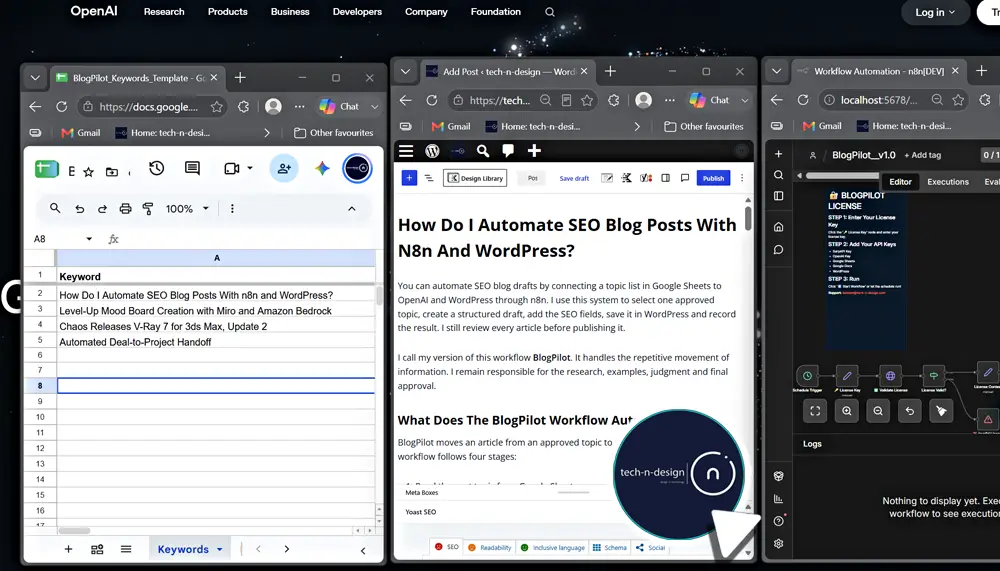
How Do I Automate SEO Blog Posts With n8n and WordPress?
You can automate SEO blog drafts by connecting a topic list in Google Sheets to OpenAI and WordPress through n8n. I use this system to select one approved topic, create a structured draft, add the SEO fields, save it in WordPress and record the result. I still review every article before publishing it.
I call my version of this workflow BlogPilot. It handles the repetitive movement of information. I remain responsible for the research, examples, judgment and final approval.
What Does the BlogPilot Workflow Automate?
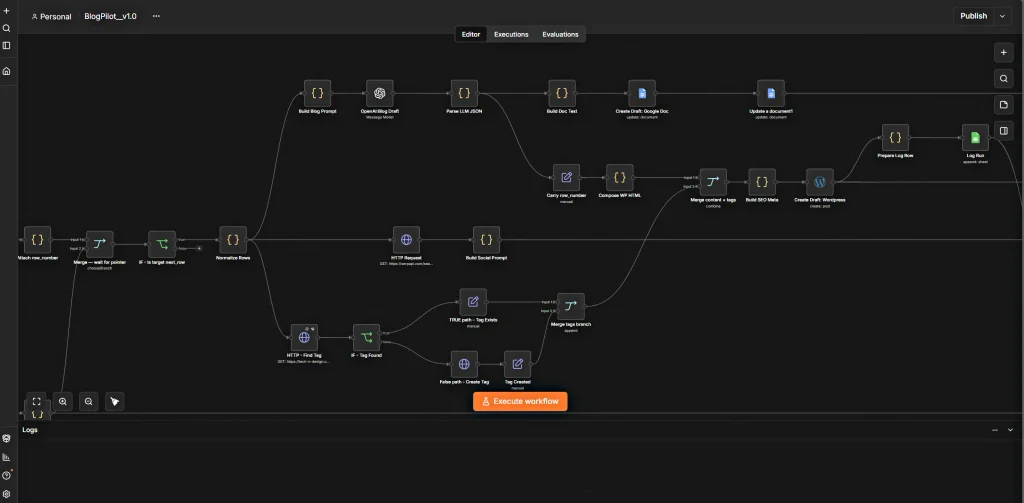
BlogPilot moves an article from an approved topic to a WordPress draft. The core workflow follows four stages:
- Read the next topic from Google Sheets.
- Generate a structured article draft with OpenAI.
- Create the post and SEO fields in WordPress.
- Log the result and move the workflow pointer to the next topic.
This is a controlled publishing pipeline. It does not search for random subjects or publish large volumes of unchecked content. I decide which topics enter the sheet. The workflow processes only those approved inputs.
If you are new to the platform, start with my guide to getting started with n8n. It explains triggers, nodes, credentials and data flow in simpler terms.
Which Tools and Credentials Do You Need?
My setup uses four main tools:
| Tool | Purpose |
| n8n | Runs the workflow and passes data between each step |
| Google Sheets | Stores topics, instructions, status information and the workflow pointer |
| OpenAI | Turns the brief into structured article content |
| WordPress | Receives the finished draft and its publishing fields |
n8n currently provides built-in nodes for Google Sheets, OpenAI and WordPress.
Each connection needs its own credential. Google uses OAuth. OpenAI uses an API key. WordPress can use a dedicated Application Password for REST API access.
An Application Password is linked to one WordPress user and is intended for integrations. WordPress stores it separately from the normal account password, and you can revoke it without changing the main login.
Use a WordPress account with only the permissions the workflow needs. Do not place passwords or API keys inside prompts, code fields or shared workflow exports.
How Does the Workflow Move From a Topic to a WordPress Draft?
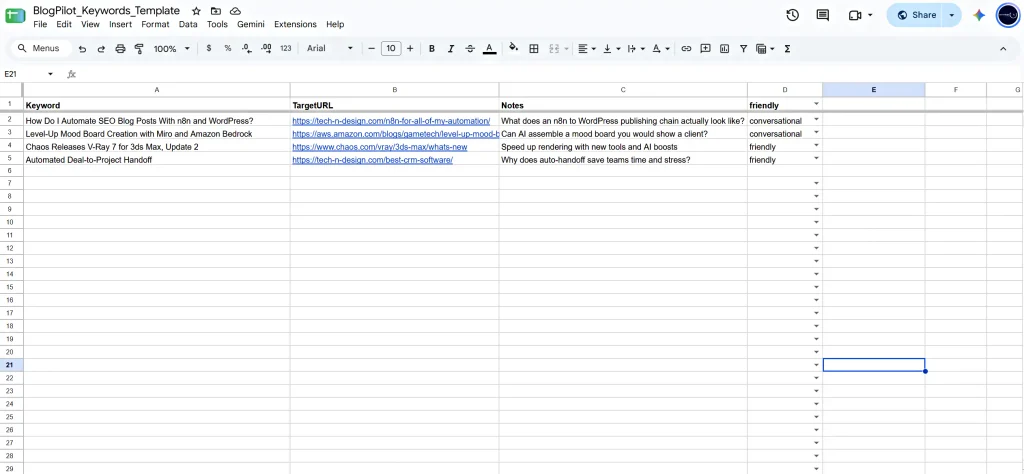
The process starts with a row in the Keywords sheet. I use that row to hold the keyword, target URL, notes, tone and any SEO instructions the article needs.
When the workflow runs, it checks the Config sheet for the last completed row. It calculates the next row and retrieves that topic. A guard then checks the Log sheet to confirm that the workflow has not already created a draft for the same run.
The selected topic moves through these steps:
1. Normalize the brief
The workflow turns the sheet values into one consistent input. This prevents missing columns or empty cells from changing the prompt structure.
2. Generate structured content
OpenAI receives the keyword, audience, notes and writing rules. I ask it to return predictable fields such as the title, introduction, headings, body, conclusion, slug and meta description.
3. Parse and format the response
The workflow checks the returned structure and converts the article body into WordPress-ready HTML. This step keeps headings, paragraphs, lists and links in the correct format.
4. Create a WordPress draft
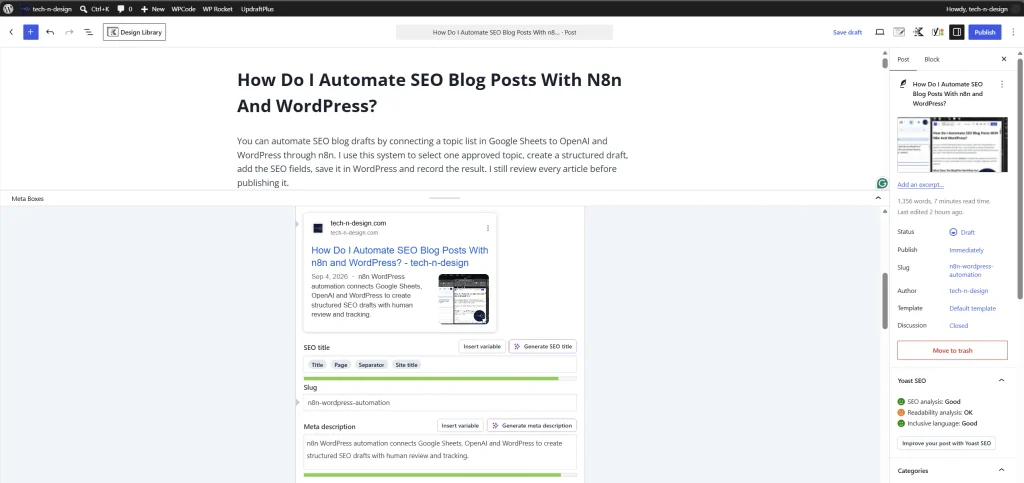
The WordPress step creates a draft rather than a live post. A separate request can add Yoast fields such as the focus keyphrase and meta description when the required WordPress endpoint is available.
5. Record the result
The workflow writes the article title, status, date and WordPress draft link to the Log sheet. It then updates the row pointer in Config.
That final record gives me a simple audit trail. I can see what ran, what it produced and which topic should come next.
For a screen-by-screen walkthrough, watch my BlogPilot automation in n8n video series.
How Do You Prevent Duplicate or Inaccurate Posts?
I use two different controls because duplication and accuracy are separate problems.
The duplicate control checks the log before creating a WordPress post. If the workflow already ran for the selected topic or date, it stops before the creation step. The row pointer changes only after the draft and log steps succeed.
The accuracy control is human review. An AI model can produce a clean sentence that contains an incorrect name, date, price or product feature. Workflow completion does not prove factual accuracy.
My review process is simple:
- Open every cited source and confirm that it supports the claim.
- Prefer official documentation for product features and technical instructions.
- Add a verification date to information that can change.
- Label unsupported information as unknown or remove it.
- Replace generic examples with first-hand screenshots, results or lessons from my own workflow.
Google states that appropriate use of AI or automation is not against its guidelines. The content still needs to be accurate, relevant and created for people rather than primarily to manipulate rankings. Google Search Central.
Should You Publish Automatically or Require Human Approval?
For BlogPilot, I recommend creating a draft and requiring approval.
Automatic publishing removes the last quality checkpoint. A broken source, malformed link, missing image or confident factual error can reach readers before you see it. Draft mode gives you the time saving without giving the workflow final editorial authority.
I check five items before pressing Publish:
- Does the opening answer the title directly?
- Can I verify every changing fact?
- Does the article add experience that competing summaries cannot copy?
- Do the internal links help the reader continue naturally?
- Does the call to action match the article’s purpose?
Google’s current guidance for generative AI search focuses on accessible, useful and original content.
What Can Go Wrong?
The most common failures occur at the connections between tools:
- Google OAuth access expires or the selected sheet changes.
- A column name changes and the workflow can no longer map the data.
- The model returns invalid JSON or leaves out a required field.
- The WordPress credential lacks permission to create a post.
- A Yoast endpoint is unavailable or rejects the metadata request.
- The log succeeds before the WordPress draft exists, creating a false completion record.
Test each node with one sample topic before activating the complete workflow. Keep the WordPress action set to Draft during testing. Review the execution data at every step, then test the full path from the sheet to WordPress.
You can also review my practical n8n workflow examples to see where this method fits within a wider automation system.
Is BlogPilot Suitable for Your Publishing Workflow?
BlogPilot suits a solo creator or small team with an approved topic list, a repeatable article format and a WordPress site. It works best when you want to reduce copy-and-paste work and keep editorial control.
It is less suitable when each article needs a completely different research method, legal or medical review, extensive interviews or immediate reporting. Those cases need a more specialised process and closer human supervision.
The useful outcome is not a high volume of AI articles. It is a reliable draft that arrives with the right structure, metadata and tracking, ready for you to improve.
If you want help setting up BlogPilot, start by mapping one topic, one draft and one log entry. Once that path works reliably, you can expand it.
FAQs
You can build the main workflow with n8n’s visual nodes. Some tasks, including strict JSON cleanup or custom WordPress metadata, may need a short Code or HTTP Request step.
My preferred setup creates WordPress drafts. I inspect the sources, wording, links, images and SEO fields before publishing.
Yes. A locally hosted scheduled workflow can run only when the computer and n8n service are available. Use a continuously running server or n8n Cloud when you need unattended execution.
Automation alone does not earn rankings. Google evaluates whether the resulting page is useful, reliable and created for people. Your first-hand evidence, clear answers and accurate sources give the article value.
It can collect sources and compare claims against them. That process reduces errors. It does not guarantee correctness. A person should verify important claims before publication.


