

How Do You Manage Project Risks and Issues?
To manage project risks and issues, record the concern, check its effect on the agreed work, assign an owner and set the next action. Review the record as circumstances change. Ask for a decision when the response exceeds your authority, then check the result before closing it.
Begin with a shared risk register and issue log. These are records you can keep in a spreadsheet. Each entry should help you answer: what needs attention, who will act, and by when?
What is the difference between a risk and an issue?
A risk involves uncertainty that could affect a project objective. In this guide, an issue means a confirmed problem requiring action. Your organisation may define or classify issues more narrowly, so follow its agreed procedure.
PMI’s explanation of risks and issues uses the distinction between a potential event and something that has happened.
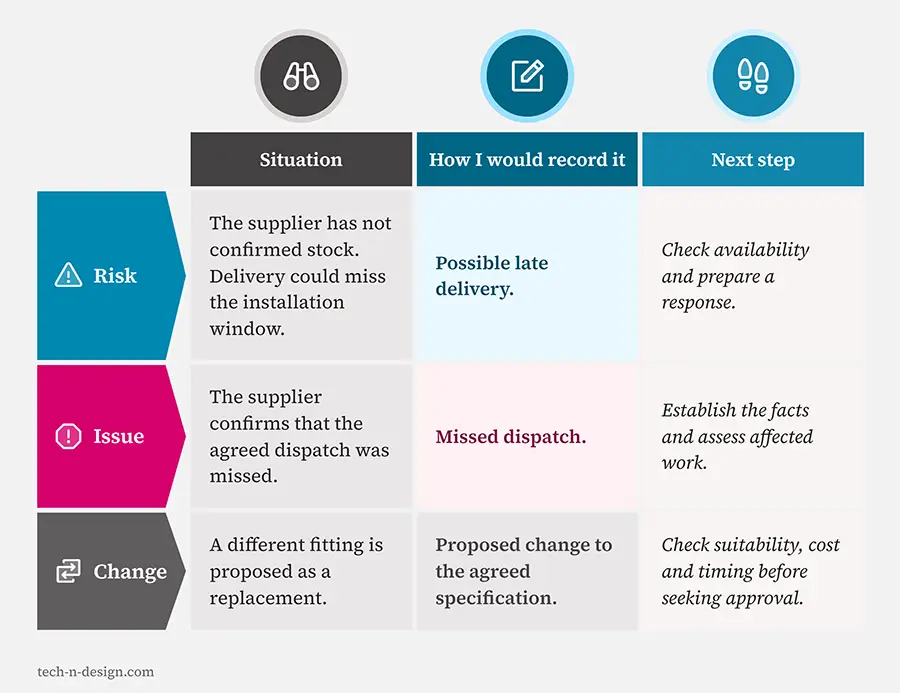
Risk also includes opportunities, such as a chance to complete work earlier. APM’s introduction to risk management covers both threats and opportunities. Here, I focus on threats and active problems.
How do you identify risks before they affect the project?
I suggest starting with the work you have promised and the assumptions supporting it. Ask the people doing the work where those assumptions could fail.
- Approvals: which decisions must arrive before the next task can start?
- Information: which measurements, drawings, files or client details are still missing?
- Suppliers: which delivery dates or availability claims need confirmation?
- People: which tasks depend on someone whose availability is uncertain?
- Dependencies: which tasks rely on another task finishing first?
Write each concern so that its cause, uncertain event and effect are visible. PMI’s guidance on causes, risks and effects explains this distinction.
For the lighting example, Write: “Because the supplier has not confirmed stock, the fittings may arrive after the installation window, which could delay testing and handover.”
The unconfirmed stock is a known gap. Late arrival is uncertain. A delayed handover is a possible consequence. This wording gives you something specific to investigate.
Which risks need attention first?
Assess likelihood, consequence and how soon you need to act. Ask what evidence supports the assessment and what remains unknown. A supplier’s written warning carries different weight from an unexplained concern.
Agree what low, medium and high mean for your project before using those labels. For impact, describe the effect on the actual deadline, available budget or acceptance requirement. If you cannot judge likelihood yet, record “not assessed” and assign someone to obtain the missing information.
In the example, give stock confirmation early attention because the replacement decision has a deadline. Waiting could remove an available option even before the delivery fails.
Reassess the risk after taking action. A request for confirmation does not prove that stock is available. Keep the current assessment visible until new evidence supports a change.
What should you record in a risk register?
A risk register holds the concern and the planned response. Below is a completed entry. In your spreadsheet, each field can become a column.
Example risk entry: R-01. “Day” refers to a working day within this fictional project.
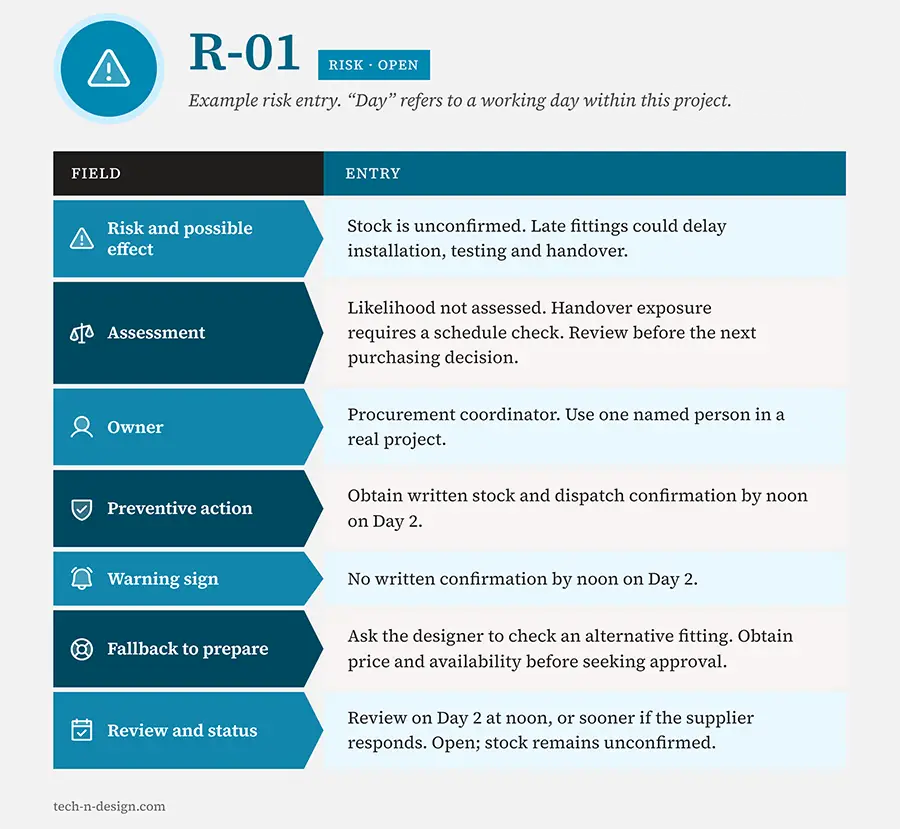
Give separate actions their own owner and deadline when different people must act. The risk owner follows up on the whole concern; that person does not need to perform every technical check.
For this example, the record would remain open after a reminder email. Update it when the supplier provides evidence or the warning sign triggers the fallback review.
What do you do when a risk becomes an active problem?
Confirm what happened
Suppose the supplier later confirms that the agreed dispatch on Day 3 was missed. Record the confirmation and request a revised delivery forecast. Check installation, testing and handover separately.
The missed dispatch is now a fact. The effect on handover may still be uncertain. Show both in the update rather than announce a delay that nobody has assessed.
Record the issue and link the original risk
Create issue I-01 and link it to R-01. The dispatch was missed; late arrival is still uncertain. Keep R-01 open and reassess it. If the recorded risk event itself occurs, mark that event as having occurred and link the issue without deleting the history. Log unexpected problems too.
Example issue entry: I-01. This is the same project, after the missed dispatch.
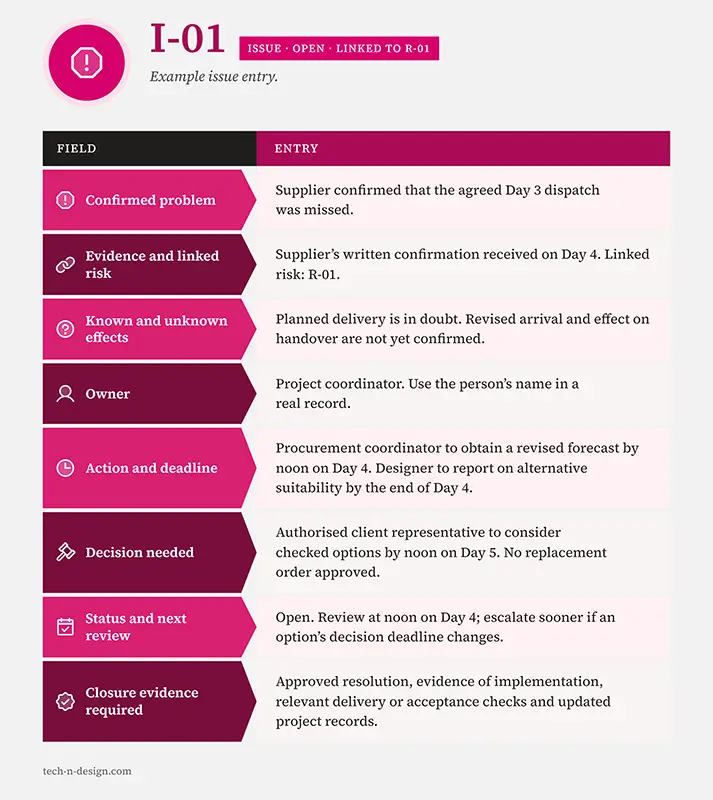
Assign actions and decision deadlines
Turn “resolve the delivery problem” into separate tasks: confirm the forecast, check the alternative, assess costs and present the options. Give each task an owner and a deadline.
If changing the sequence or reallocating people could help, check the effect on their other commitments. My guide to adaptive resource allocation discusses that wider coordination work.
For a digital project, the same distinction could apply to client files. Before the agreed handover of those files, late arrival is a risk. Once the deadline is missed, you have an issue to assess and act on.
When should you involve the client or project sponsor?
Escalation means taking a concern or decision to someone with the authority to act. A project sponsor is the person accountable for supporting and directing the project at that level.
Agree who holds decision authority at the start. Involve the authorised person when a response needs approval, a commitment is threatened, or the team cannot resolve the problem within its agreed limits. APM’s risk and issue management guidance includes ownership, responses and escalation.
For the lighting issue, send a short decision request covering:
- The confirmed problem and the evidence supporting it.
- The effect assessed so far, with remaining unknowns.
- The checked options, their costs and their timing.
- My recommendation, the decision deadline and what waiting could affect.
A supplier’s suggested replacement still needs the appropriate design and technical checks. Stop before ordering or instructing changed work if those checks or approvals are missing. Bring in the responsible designer or technical specialist.
If the response changes agreed scope, specification, cost or dates, follow the project’s approval procedure. My guide to managing project change requests explains how to assess and record that decision.
If the problem affects several activities, assess a wider recovery plan. My article on getting a delayed project back on track covers that broader review.
How do you review and close risks and issues?
I suggest using the normal project review to check open entries, then setting earlier reviews around decision deadlines and warning signs. An urgent problem needs attention before the next scheduled meeting.
Ask what changed, which actions are overdue, what evidence is missing and what decision is needed next. Update the forecast and the remaining exposure after each response.
For the lighting issue, keep it open until the approved solution has been implemented and the required checks recorded. A placed order alone would not demonstrate that the installation problem is resolved.
To close the entry, record who checked the result, when they checked it and where the evidence is stored. If a concern continues into handover, assign it to an accepting owner and keep that transfer visible.
A risk can close when its exposure has ended. Choosing to accept an ongoing risk means continuing to monitor it under the agreed arrangement.
What should you do next?
Choose the concern most likely to disrupt your current project. Record what is known, what remains uncertain, who owns the next action and when you will check it. Use that entry at your next project discussion.
FAQs
Yes. Use separate tabs for a small project, with reference numbers linking related entries. Give the people responsible for updates access to the shared version.
An issue needs assessment and a response. A change request is needed when the proposed response requires a change under your project’s approval rules. A problem resolved within existing authority may not need that additional process.
Set the frequency around the project’s pace and upcoming decisions. Update an entry when evidence, ownership, actions or consequences change. Do not wait for a routine review if the decision is needed sooner.


